

The MLS Cooperation Legal Defense Fund is Now Active

On October 16, Compass filed an antitrust suit against CRMLS after we refused demands that would ultimately lead to a fractured, unequal marketplace. But CRMLS isn’t the only entity Compass is targeting, as MLSs across the nation have challenged its push to control who can access and benefit from listing data.
To ensure the marketplace remains fair, cooperative, and competitive for all, we’ve created the MLS Cooperation Legal Defense Fund. This fund is now operating and accepting contributions to support those impacted by the practice of withholding listings and to fight to protect transparency in real estate.
To learn more and get involved, please reach out to [email protected].
For more legal updates and resources, visit our Protecting Cooperation Resource Page.
Interview with CEO Art Carter: Protecting Cooperation
On November 10, our CEO sat down with Inman to discuss our stance against Compass and how we will keep fighting to support a fair, open marketplace. Click here to learn more about Art’s thoughts on litigation, cooperation standards, maintaining strong property valuations, and more.
Note: Subscription access may be required to read the interview above.
Training for the Questions Your Team Is Asking
Request a training session for answers to your office’s most frequently asked MLS-related questions. From listing management to CMAs, our education team covers a wide range of topics to support your workflow and business goals.
Which training topic would most benefit your agents? Let us know here!
🎊Holiday Office Closures
The CRMLS office will be closed on the following dates:
- Thursday, November 26 & Friday, November 27, in observance of Thanksgiving
- Thursday, December 24, 12-5PM in observance of Christmas Eve
- Friday, December 25, in observance of Christmas
- Thursday, December 31, 12-5PM in observance of New Year’s Eve
If you require assistance during the times above, please log in to your REcore Workspace and submit a support form. A CRMLS representative will address your inquiry on the next open business day. Additional support resources and answers to frequently asked questions are available here.
We hope you have a festive holiday season.
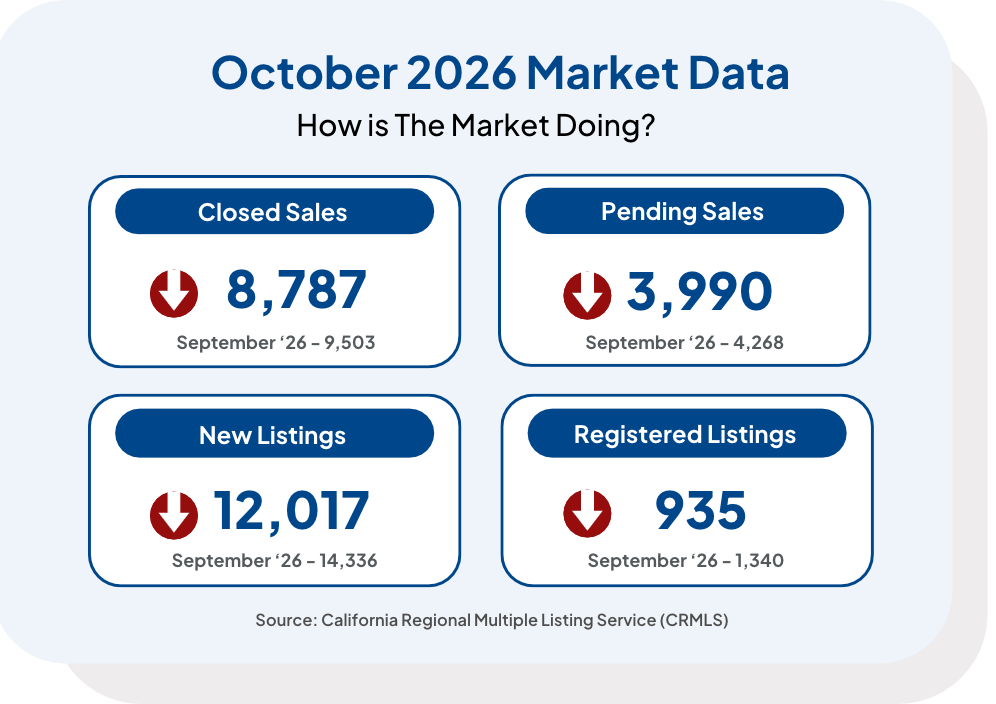
MLS Stats
Compliance
Rule 11.8: Removing Media or Property Information from the MLS
CRMLS Rule 11.8 prohibits removing any historical data, including photographs, from the MLS once the listing is in a finalized status. This applies to listings that are Closed, Leased, Canceled, or Expired, and/or not subject to a purchase contract (i.e., Active Under Contract or Pending status).
If the client requests to remove any photos or property information once a listing is finalized, the listing agent can ask their local association or CRMLS to change the listing to “Internet: NO.” This will block third-party sites from retrieving the listing photos. However, neither the association nor CRMLS can guarantee that third-party sites will remove all historical photos once they have been circulated online. Additionally, the listing agent is neither required nor obligated to remove photos from a finalized listing.
As an alternative to requesting “Internet: NO,” only the primary photo of finalized CRMLS listings will appear on third-party sites. All other photos will remain visible on the MLS.
Note: All listings in the MLS must contain at least one (1) photo showing a substantial portion of the property’s exterior, always, regardless of status.
Read our guide for more instructions on switching the Internet Display: YES/NO.
Read the Rules and Policies and Knowledgebase for more compliance information.
CRMLS Compliance Monthly – Top Violations Overview for 2027
The new year will be here faster than you think, with updated rules and policies to consider. To stay up to date on the latest compliance information, join us for the first Pro Standards Top Violations Overview of 2027.
CRMLS Compliance Monthly Top Violations Overview
Tuesday, January 19, 2027, at 10:00 AM PT

Broker Compliance Helpline
You can contact the Broker Compliance Helpline in three simple steps:
- Make sure your MLS ID is ready . To confirm your ID has the correct MLS user class, please email [email protected].
- Call us directly at 909-859-2043
- Press 3 to speak to a Compliance Analyst for live assistance
You can reach us Monday – Friday from 8:30 AM – 4:00 PM PT.
Note: Only active brokers, office managers, and personal/office assistants connected to a broker or office manager, can use the helpline. Please do NOT share this phone number with agents.
If you have questions regarding your user class or personal/office assistant accounts, please contact us at [email protected].
Enhancements & Products Corner
Build Skills. Boost Performance.
- An Internet Data Exchange (IDX) is how cooperating brokerages share listings through websites and portals. This guide covers how to update how listings are display on IDX feeds.
- The Matrix Branding Center is the centralized way to ensure your brand is comprehensively displayed across platforms. Brand client touchpoints with your logo and color-scheme in Matrix and OneHome.
Training Tip: How does DAM/CDAM work and when does it reset?
DAM – Days Active in MLS
- Definition: Counts the days a home is currently in an Active or Active Under Contract status in the MLS
- Calculation: Based on the specific MLS number
- Reset Rule: Resets to zero whenever a property is relisted or changes status from Active/Active Under Contract to something else (e.g., Closed, Canceled, etc.)
CDAM – Cumulative Days Active in MLS
- Definition: Tracks the total time a property has been marketed in the MLS, including previous, consecutive listings
- Calculation: Based on the APN (Assessor’s Parcel Number) or address
- Reset Rule: Resets to zero only if the property has been off the market for 30 or more consecutive days or if there is a change in ownership
Key Differences Summary
| Feature | DAM (Days Active in MLS) | CDAM (Cumulative Days Active in MLS |
| Focus | Current listing status | Total time on market |
| Reset | Resets on every new listing | Resets after 30 days off-market |
| Tracking | Individual MLS Number | Property Address/APN |
| Purpose | Shows current active duration | Shows overall market history |
Note: If a listing is canceled and then relisted within 30 days, the DAM starts at 1, but the CDAM continues counting from the previous listing.
Train Smarter, Not Harder.
Training is available to CRMLS users at no additional cost. Whether you prefer personalized instruction, team training, or self-paced learning, CRMLS has options to fit your needs.
- For Agents: Get personalized 1-on-1 Zoom training tailored to your goals
- For Offices: Choose from Virtual, Hybrid, or Live training for your team
Note: Live training requires a minimum of 15 attendees.
View our training resources below:
▶️ Learn Anytime with YouTube/CRMLSTV
Prefer to learn at your own pace? Visit our CRMLSTV YouTube Channel for access to our library of pre-recorded training videos, tips, and helpful resources.
Learn. Train. Improve.
We’re here to help you get the most out of your tools and resources.
Contact us at: [email protected] to connect with an expert trainer.
Paragon
- 11/17 Paragon Update: A new radius drawing tool, easy hotsheet access, and more in Paragon Connect, along with more control over client outreach in Paragon Pro
Did You Know?
Still exploring your new REcore Workspace? Review our FAQs and guide for an overview of the latest features and customization options to enhance your dashboard experience.