

Your Seller Decides Where Their Property Appears Online During Coming Soon
New form gives sellers more control over Coming Soon listing distribution

CRMLS has introduced a new option for Coming Soon listings that gives sellers greater control over how their property is distributed online.
This option is supported by a new form titled “Seller’s Instructions for Limited Exposure in Coming Soon Status.”
Key Points:
- Sellers may choose how their Coming Soon listing is marketed by either:
- Limiting exposure to broker-controlled websites and social media platforms only; or
- Utilizing the full range of marketing opportunities available through CRMLS, including IDX/VOW websites, real estate portals, syndication websites, broker websites, and social media platforms.
- A new form, “Seller’s Instructions for Limited Exposure in Coming Soon Status,” is now available.
- The form should be used when a seller elects to market their Coming Soon listing exclusively through broker-controlled websites and social media platforms (Limited Exposure).
- The form helps protect agents by documenting the seller’s instructions and election of Limited Exposure while providing clear disclosures regarding the potential impact on marketing, visibility, and online distribution.
- This form does not replace the “Seller Instruction to Place Listing into CRMLS Coming Soon Status” form. Both forms are required for a listing to be placed in Coming Soon status and distributed online through select channels.
How are Coming Soon listings distributed today?
By default, CRMLS Coming Soon listings are set to “Internet=Yes”, so that the listing is to be distributed through all CRMLS marketing channels including IDX/VOW, portals and syndication websites.
How does this form change that?
With the new form, sellers may choose Limited Exposure for their Coming Soon listing. When this option is selected, the listing may continue to be marketed through broker-controlled websites and social media, while distribution to third-party websites is restricted.
How do I utilize this new option?
It’s simple:
- Review and complete the “Seller’s Instructions for Limited Exposure in Coming Soon Status” form with your seller.
- Review and complete the “Seller Instruction to Place Listing into CRMLS Coming Soon Status” form, then enter your listing in the MLS as Coming Soon
- Set “Internet = No”
What’s important to know?
When a Coming Soon listing is changed to Active status, the Internet setting does not automatically change. If the seller wants the listing distributed online on any platform or website, including the listing broker’s then you must manually update “Internet = No” to “Internet = Yes“. You can find these steps in our quick reference guide.
Why is this new form, and its accompanying policy, being implemented?
CRMLS has amended its Coming Soon policies over the years to address broker requests, AOR policies, and practices from neighboring MLSs to keep a fair and representative marketplace. This new form is another step in that evolution, providing sellers an added level of choice and giving brokers greater flexibility to meet their clients’ preferences.
CRMLS remains committed to providing options that help brokers serve their clients while supporting a fair and transparent marketplace.
Introducing the New Dashboard Experience: REcore Workspace
Effective August 4 at 9 PM PT, your REcore dashboard will evolve into Workspace, a modern interface that streamlines your daily workflow.
What do I need to do?
Nothing at all! The transition on August 4 will be automatic. Simply go to the usual REcore login page, enter your MLS credentials, and enjoy your new, more customizable Workspace.
Will I lose things like profile details, product access, tasks, or other information I’ve previously saved?
No. All your profile details, including historical information, data, and insights, will transfer over.
What’s in Workspace:
- Customizable display: Choose default color themes and tailor your Workspace, so your most-used tools and resources are the easiest to access.
- Cleaner, more intuitive layout: Access your notifications, messages, tools, and support team without switching tabs.
- Seamless navigation: Move from section to section without losing your workflow.
- More widgets at your fingertips: Your expanded toolbelt includes the HouseCanary AVM for quick pre-listing research.
Workspace is designed to save time on the small stuff so you can focus on what you do best: supporting your clients.
Want a quick tour first? Visit the Knowledgebase for a quick guide and FAQs to maximize your Workspace benefits.
Note: Workspace will be unavailable from 9:00 PM PT on August 4 until 6:30 AM PT on August 5 during installation.
In One Month, It’s Time to Thrive

The countdown has begun! In just one month, Thrive Broker Summit kicks off on August 31.
Join hundreds of real estate leaders for an unforgettable two-day experience designed to help you stay ahead in an ever-changing industry. From meaningful networking on day one to a full day of insightful keynotes, panel discussions, and educational sessions on day two, Thrive is where the brightest minds in real estate come together.
If you haven’t registered yet, now’s the time. You won’t want to miss the ideas, connections, and conversations that will help shape what’s next in real estate.

Your registration includes:
Day 1 | Monday, August 31
- Welcome Reception
- Arrive & Thrive Stride (Sponsored by REALTOR.com), an intimate seaside walk led by CRMLS Chair Carolyn Triebold alongside fellow attendees and featured speakers
- Sip & Thrive Soiree, an evening cocktail event where you’ll connect with industry peers, CRMLS leadership, and many of our featured speakers.
Day 2 | Tuesday, September 1
- A full day of keynote presentations, panel discussions, educational sessions, and networking with leaders from across the real estate industry
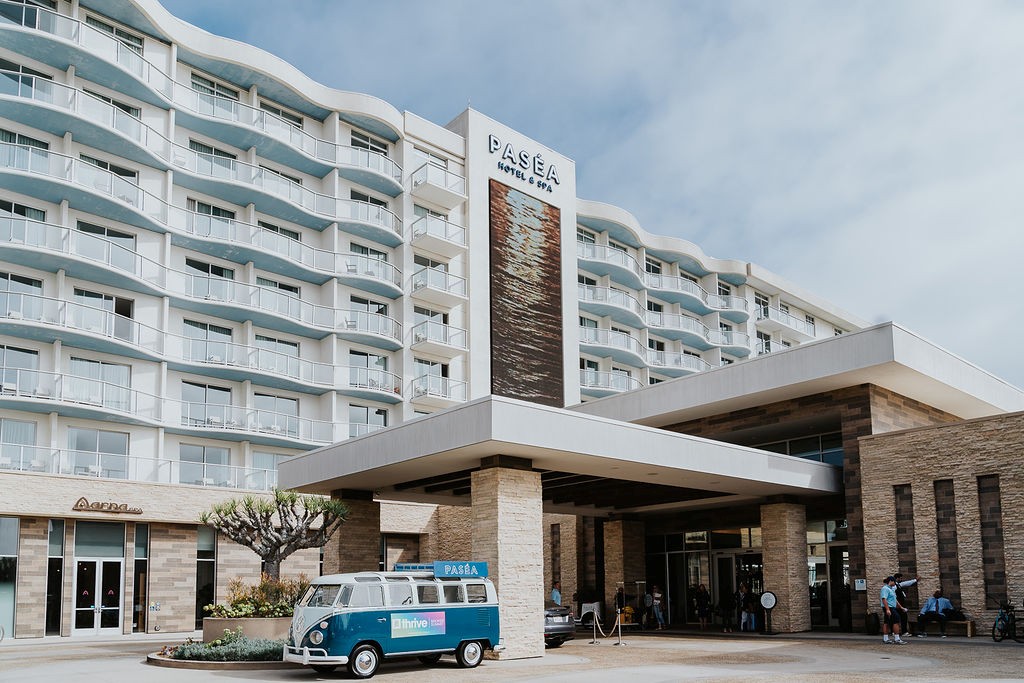
Make the most of your Thrive experience by reserving your room at the Paséa Hotel & Spa and enjoying everything Huntington Beach has to offer just steps from the conference.
We’re so excited for you to witness the amazing lineup we’re gathering for our brokerage community. See you this summer!
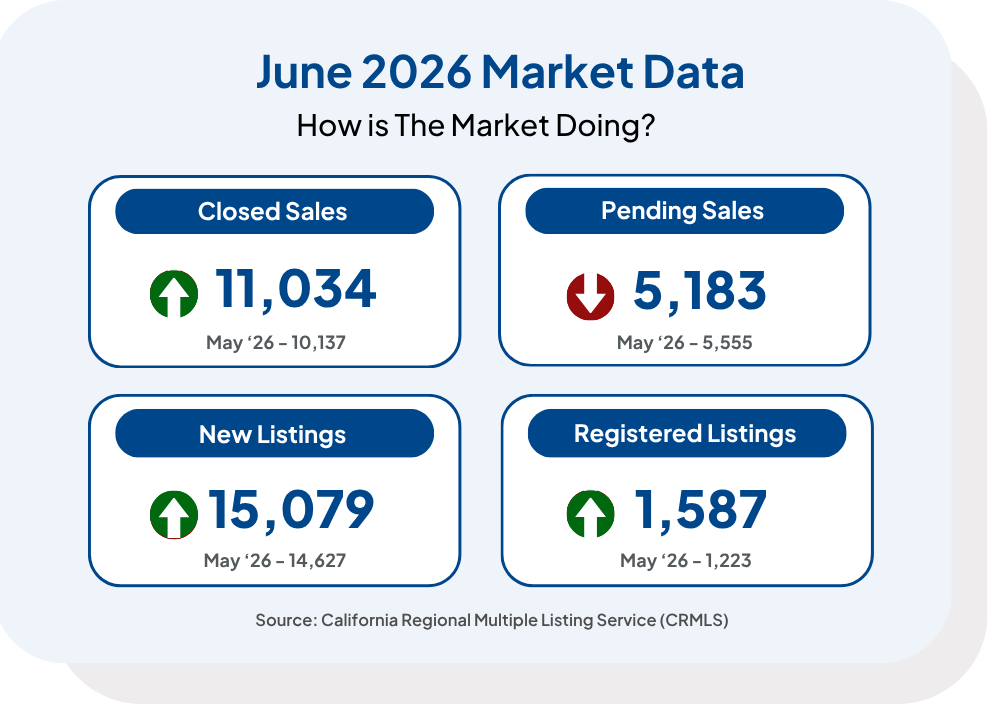
MLS Stats
Compliance
The Prior Authorization Rule
CRMLS Rule 11.5(d) prohibits the reuse of MLS photographs, even with the original owner’s permission. Reusing photographs from the MLS will result in a “double watermark” on each photo, which violates MLS rules.
What to Know:
When uploaded to the MLS, each photo is stamped with a watermark displaying the letters “CRMLS” in the bottom-right corner. This watermark indicates that the uploaded photo is original. It also indicates that the listing photos comply with the CRMLS compilation copyright guidelines.
If a photograph is copied from another listing and uploaded to a new listing, regardless of permission, the watermark from the copied photograph will carry over to the new one. The new watermark will apply to the uploaded photograph, resulting in a double watermark.
How to Comply:
CRMLS rule 11.5(d) requires written authorization from the rightful owner of the media before adding it to a listing. To avoid double watermarks, always get the original or unmarked versions from the owner, and never copy photos directly from another listing.
For compliance tips, review the Photographs and Media FAQs from our Knowledgebase.
Read the Rules and Policies and Compliance Knowledgebase library to learn more.
Compliance Presentations are Available to Your Brokerage
The CRMLS Compliance department is available to provide your agents with complimentary presentations. Please complete our form to schedule a training session.
Broker Compliance Helpline
You can contact the Broker Compliance Helpline in three simple steps:
- Make sure your MLS ID is ready . To confirm your ID has the correct MLS user class, please email [email protected].
- Call us at 909-859-2043
- Press 3 to speak directly to a Compliance Analyst for live assistance
You can reach us Monday – Friday from 8:30 AM – 4:00 PM PT. Please do NOT share this phone number with agents.
Note: Only active brokers, office managers, and personal/office assistants connected to a broker or office manager, can use the helpline.
If you have questions regarding your user class or personal/office assistant accounts, please contact us at [email protected].
Enhancements & Products Corner
Upcoming Product Webinars
Join our upcoming webinars to gain insight into our products and systems!
- RentEdge by RentSpree: Discover the next-gen rental tools in your MLS
- Realtors Property Resource
- Cloud CMA
- SavvyCard: Personalized, Digital Business Cards
- CRMLS App
- ShowingTime for the MLS
- SkySlope Forms & Breeze: Documents and Disclosures Made Easy
- Getting Started with Rayse
- RealReports: Property Reports That Stand Out
- CubiCasa: Create Floor Plans in Minutes
- REImagineHome: Instant, AI-Assisted Virtual Staging
- Down Payment Resource
- Infosparks Market Statistics
Flex
Join our upcoming Flexmls webinars available to you!
Matrix
Join our upcoming Matrix system webinars available to you!
- Creating a CMA
- Client Collaboration
- Searching 101
- Agent Essentials
- Managing Listings
- Realist Tax
- CRMLS Systems & Products Overview
Paragon
- Paragon Update: Enhanced site navigation in Paragon Connect
- How to Add a Listing: Your guide to updating listings in Paragon
- Partial Listings: Learn how to view partial/incomplete listings in Paragon
Join our upcoming Paragon system webinars available to you!
Did You Know?
We offer a variety of rental-focused tools and resources to help showcase your expertise to clients. Check out RentSpree’s new Rental Price Report for quick access to property comps, and use our Disaster Relief Rentals guide to find emergency, temporary, temporary housing right in your MLS. .